
ALZ-lite
For: team leads deploying the foundation and members testing its guardrails.
When: Step 2 (T-7), Step 4 (T-1) and C2.
Before you start: complete Step 1 and the access requirements. This guide explains the landing zone; the deployment steps hold the commands.
The two-subscription model
Section titled “The two-subscription model”Each team uses two kinds of subscription:
- One shared services subscription, held by the team lead. It hosts the hub, the management group hierarchy, central policies and the central Log Analytics workspace.
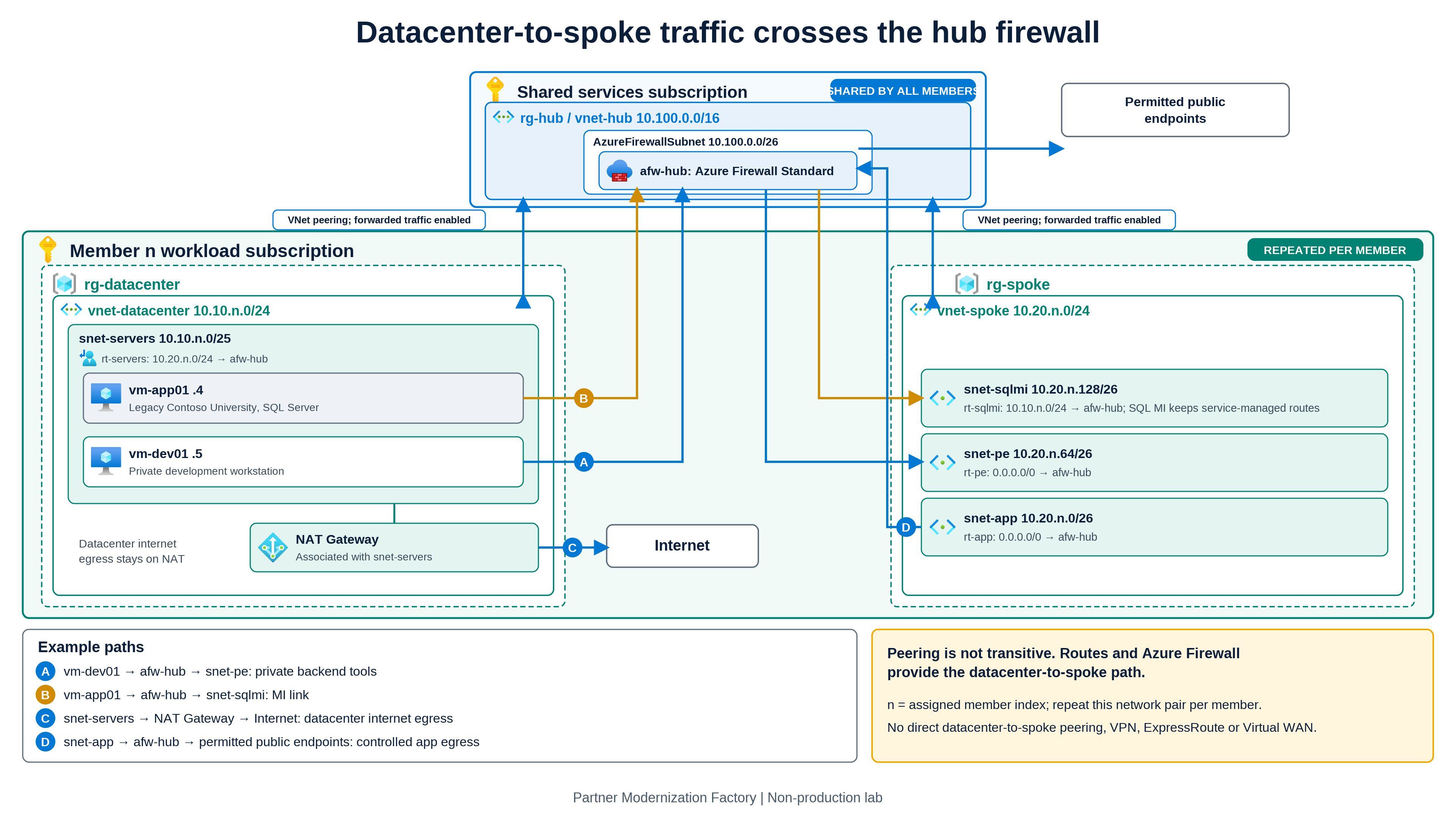
- One workload subscription per member, vended into the hierarchy with subnets, hub peering, UDRs (routes), DNS, firewall rules, RBAC and a subscription budget. Vending also sets Foundational CSPM only, with paid Defender plans off. The hub is shared; each spoke is a member’s network peered with it.
This mirrors the real distinction between platform-team-owned shared infrastructure and workload-team-owned application resources, at a scale that fits a two-day event.
What the team lead needs
Section titled “What the team lead needs”The built-in Owner role at Tenant Root scope (the pipeline’s preflight checks for the role named Owner, so an equivalent custom role doesn’t pass). Tenant Root is the top management group of your Microsoft Entra tenant: every other management group and subscription sits under it, and a management group is a container that policy and access flow down from. Without this role, the foundation stage can’t create management groups, move subscriptions into them or assign policies, and the run fails early with a clear permissions error.
In most tenants nobody has that role by default. A Global Administrator elevates access (Microsoft Entra ID > Properties > Access management for Azure resources: Yes) and grants the team lead Owner at Tenant Root (Management groups > Tenant Root Group > Access control (IAM)). After refreshing sign-in (az logout, then az login), the lead reruns ./scripts/Initialize-PlatformPipeline.ps1 -RosterPath .local/roster.json from factory/ as in Step 1.5, so the pipeline identity gets Tenant Root Owner too. Then rerun the stage; a fresh user login alone cannot repair the pipeline identity’s role.
What the deploy creates
Section titled “What the deploy creates”The team lead deploys ALZ-lite with the foundation stage at T-7, before the event, against the shared services subscription. The whatif stage shows the changes first without deploying. Step 2: Foundation and Graph grant has the steps.
- Management groups and reader group:
mg-factoryunder Tenant Root, withmg-factory-platform(holds the shared services subscription) andmg-factory-corp(holds the members’ workload subscriptions) beneath it, plus one built-inReaderrole assignment atmg-factoryfor the Entra security groupmg-factory-readers(bootstrapped beforehand withSync-FactoryReaderGroup.ps1). rg-management: thelog-managementworkspace (30-day retention) and the identityid-sqlmi-directory.rg-hub:vnet-hub,afw-hub(Azure Firewall Standard) with its public IP and theafwp-hubpolicy (DNS proxy on), and the private DNS zones for Blob, Service Bus, the container registry and Key Vault, linked to the hub.- Defender for Cloud and policy: Foundational CSPM only (cloud security posture management: recommendations, no paid protection plans), and the core policies at
mg-factory-corp(summarized in the table below; the full list is in the foundation README).
See the stage timing table for the deployment estimate. The foundation costs about $1.30 an hour while it exists; the firewall bills until rg-hub is deleted. A re-run converges. Policies can take up to 30 minutes to take effect.
Vending then connects each member’s workload subscription and datacenter to the hub. The team lead runs it at T-1, after each member’s Step 3 datacenter and vm-dev01 setup (the pipeline verifies vnet-datacenter and vm-app01’s Azure Arc Connected status automatically), because it changes the datacenter’s DNS to the hub firewall. See Step 4: Vending for the steps and the naming and IP plan for the addresses.
One step that needs a directory role
Section titled “One step that needs a directory role”ALZ-lite creates the identity id-sqlmi-directory in rg-management. Every member’s SQL Managed Instance uses it, so CREATE USER ... FROM EXTERNAL PROVIDER can look up the web app’s identity in C7. Once per team, right after the foundation stage, someone with the Privileged Role Administrator (or Global Administrator) Microsoft Entra directory role grants it Microsoft Graph read permissions (the three read-only application permissions that let SQL Managed Instance look up Entra users and apps) with ./scripts/Grant-SqlMiDirectoryRead.ps1 -SharedSubscriptionId <shared-services-subscription-id>. The team lead usually doesn’t hold that role, so they book a role holder for T-7 to run the grant right after ALZ-lite. If they cannot find one, they escalate to the event owner. The role holder runs the script from their own computer, signed in as themselves, not in the team lead’s signed-in terminal. They don’t need the lead’s repo: the script is one file with no other kit dependencies, so they download Grant-SqlMiDirectoryRead.ps1, install PowerShell 7 and the Azure CLI, and need Reader on the shared services subscription. The grant is tenant-wide and read-only, and members can attach the identity to other resources during the event, so the team lead agrees it with the tenant owner first and arranges for the identity to be deleted afterward (details). Step 2: Foundation and Graph grant has the exact step, and the team checks the grant on day one.
Fixed values
Section titled “Fixed values”- Region:
swedencentral, withgermanywestcentralas the fallback if capacity is constrained. - Hub address space:
10.100.0.0/16. - Azure Firewall: Standard SKU, DNS proxy enabled. No Premium features (TLS inspection, IDPS) — out of scope for a two-day event.
- Defender for Cloud: Foundational CSPM only (free). Paid plans are off across the whole shared services subscription and every vended workload subscription. This deliberate AI-readiness gap is carried into C10, not silently worked around.
- No availability zones pinned, and no zone redundancy explicitly turned on anywhere in the kit. Where a service is zone-redundant automatically with no extra configuration (for example, Azure Container Registry or Azure Service Bus Premium), that’s the platform’s default behavior, not a kit setting — see the availability zones reference.
How it compares with a full ALZ
Section titled “How it compares with a full ALZ”A full Azure Landing Zone, as the portal accelerator deploys it, adds the following. The 08:30 kickoff uses slides or a short recording to contrast it with ALZ-lite, which deliberately narrows the scope for a two-day event:
| Full ALZ | ALZ-lite |
|---|---|
| Platform, Landing Zones, Sandbox and Decommissioned management groups | mg-factory (under Tenant Root) with mg-factory-platform and mg-factory-corp beneath it |
| Multiple landing zone management groups (Corp, Online, Local) | One management group (Corp) |
| Full Azure Policy initiative set (hundreds of built-ins) | A small, fixed set: Audit for location, Deny for public network access/public IPs, DeployIfNotExists for private DNS and diagnostics (Audit only reports, Deny blocks the request, DeployIfNotExists adds the missing setting) |
| Defender for Cloud with paid plans | Foundational CSPM only, free |
| Hub with ExpressRoute/VPN gateways | Hub with Azure Firewall and no gateways: no ExpressRoute or VPN. The simulated datacenter peers with the hub instead, which stands in for the on-premises link |
None of these are mistakes in ALZ-lite — they’re intentional simplifications for a lab, documented so you know what a real customer engagement would add back.