
Requirements
Validated on: 2026-11-17 (documentation review; reconfirm access, plans and product requirements before each event).
This page lists what you need before you deploy anything. Checking it takes about 30 minutes, plus any time your organization needs to grant access. Ask for access early: that is the slow part. If something blocks you before day one, ask your team lead; they can escalate to the event owner.
Team size and setup paths
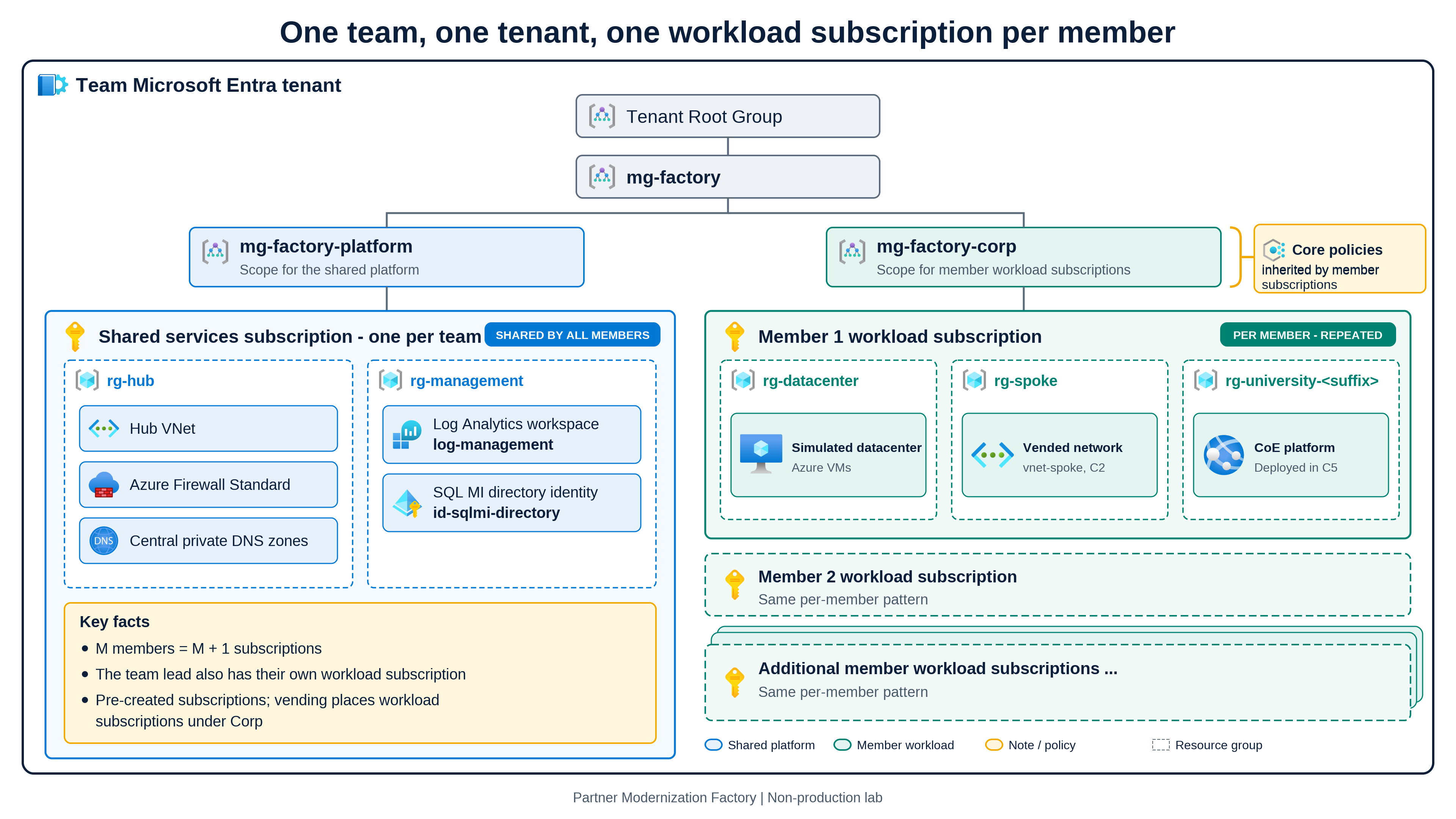
Section titled “Team size and setup paths”Each platform team has n members (including one team lead) sharing one Azure hub:
- one Microsoft Entra tenant,
- one shared services subscription, which the team lead holds,
- one workload subscription per member (
nworkload subscriptions, son + 1subscriptions in total; for example, a five-member team uses six subscriptions).
You can run the kit as Path A: Self-service teams (typically 3 to 5 people per hub, where each member sets up their own repo and datacenter) or Path B: Lead-provisioned cohort (one platform team with n attendees sharing one hub, where the team lead pre-provisions all student repos, datacenters and spokes). When a single-hub cohort has n > 5 attendees, group attendees into 3-to-5-person breakout pods (each with a nominated pod lead) for C1, C4 and C10 collaboration. See Roles.
Accounts and access
Section titled “Accounts and access”| What | Requirement | Who grants it and by when |
|---|---|---|
| Tenant and subscriptions | Use a dedicated, non-production Microsoft Entra tenant and dedicated, empty subscriptions: one shared services subscription and one paid workload subscription per member. The kit moves workload subscriptions under mg-factory-corp, applies Deny policies, leaves Foundational CSPM only, turns every paid Defender for Cloud plan off subscription-wide and sets budgets. Teardown removes the kit’s named resource groups. Never use subscriptions with other workloads. | The event owner and partner Azure administrator, before T-14. |
| Azure subscription type | Use a paid, supported subscription type. Azure Pass, Sponsorship and Microsoft Partner Network benefit offers are not supported; check the supported SQL Managed Instance subscription types. Preflight does not check the offer type. | Partner billing administrator, before T-14. |
| GitHub account and organization | Have a personal GitHub account in your partner’s organization. In Path A, the organization must let each member create a private repo from the apex-accelerator template; in Path B (Initialize-CohortRepos.ps1), the team lead creates the private student repos and invites each attendee as a collaborator (confirm collaborator invitations are allowed and main rulesets permit direct student evidence pushes). Allow actions/checkout, actions/upload-artifact and azure/login, and keep repos private. | Partner GitHub organization owner, before T-14. |
| GitHub environments | The owner reported a successful private-repo pipeline test on GitHub Free in October 2026. Current GitHub documentation says private-repo environments require Pro for personal accounts or Team for organizations; private-repo required reviewers are Enterprise-only. A later private-repo test confirmed environment, branch-policy, variable and dummy-secret setup, but could not verify the account plan or required-reviewer availability (issue #203). Verify Step 1.5 in your partner organization before T-14. If required reviewers are unavailable, repo write access is the gate, so keep the repo private and the writers few. | Partner GitHub organization owner, before T-14. |
| GitHub Actions billing | Private-repo runs draw from the plan’s included compute usage; additional usage is billed to the repository owner. Check the organization’s Billing & Licensing page, budget and payment method before the event (GitHub Actions billing). | Partner GitHub billing administrator, before T-14. |
| GitHub Copilot | Each attendee needs a paid Copilot seat: Business or Enterprise through the organization, or Pro/Pro+ individually. The organization must allow agent mode, MCP servers (disabled by default) and the models used by the APEX agents. Copilot CLI is optional and is needed only for the playbook’s CLI path. | Partner GitHub organization owner, before T-14. |
| Azure role | Each member needs unconditional Owner on their workload subscription (direct, inherited or through a group). If it is eligible through Privileged Identity Management (PIM), activate it first. Contributor does not pass. | Partner Azure administrator, before T-14. |
| Team lead only | In addition to being a member with Owner on their workload subscription, the team lead needs Owner at Tenant Root and Owner on the shared services subscription. A Global Administrator must elevate access to grant Tenant Root Owner. It must be in place for Step 1 pipeline setup at T-14. For Sync-FactoryReaderGroup.ps1 (Microsoft.Graph.Authentication module), an authorized Entra operator bootstraps <mgPrefix>-readers before Step 2 (foundation; activate User Administrator in PIM if the tenant restricts user group creation), and the designated group owner syncs the full roster before Step 4 (vending). Separately, the team lead books a Privileged Role Administrator for the T-7 SQL MI Graph grant; that role holder needs PowerShell 7, Azure CLI and Reader on the shared services subscription. Escalate to the event owner if you cannot find a role holder. | Partner directory administrator grants the roles by T-14; team lead books the role holders for T-7. |
| MFA | Register MFA for your Azure identity. Set it up at aka.ms/mysecurityinfo if you have not. | Each attendee, before T-14. |
| Region quota | Enough regional vCPU quota in your event’s region (swedencentral unless told otherwise) for two Standard_D8as_v6 VMs (16 vCPU in total), plus quota for the archetype’s SQL Managed Instance and App Service in C5. Preflight does not check quota. In the Azure portal, choose Usage + quotas and filter by your event’s region. If quota is short, ask your team lead to escalate to the event owner. | Partner Azure administrator, before T-14. |
| Azure Hybrid Benefit | Windows Server Azure Hybrid Benefit is on by default for vm-app01; if you lack eligible Windows Server licenses, use the no-hybrid-benefit input. This does not change the separate Windows 11 requirement below. See Azure Hybrid Benefit. | Each attendee confirms their entitlement before Step 3 (T-3). |
| Windows 11 licensing | Each vm-dev01 user needs an eligible per-user license that grants rights to run Windows 11 on Azure. Qualifying subscriptions include Windows 11 Enterprise E3/E5, Microsoft 365 E3/E5/A3/A5/F3 or Business Premium, Windows VDA E3/E5, and Windows Education A3/A5. See Microsoft’s Windows 11 licensing guidance. | Each attendee and the partner licensing administrator, before Step 3 (T-3). |
| Cost | The shared foundation costs about $1.30 per team-hour from T-7 through teardown at T+2. When a member’s datacenter and archetype are both running, add about $3.38 per member-hour (planning-window estimate: $280.80 + ($204.15 × n) for n members sharing one hub). The cost page gives per-member rates and event estimates. | Event owner and partner budget owner, before T-14. |
Done when you can sign in to the Azure portal, see your workload subscription, and the role shown for it is Owner.
Why each member needs their own subscription
Every member’s datacenter, network and archetype live in their own workload subscription, so members can work in parallel without affecting each other. The team shares one hub network and one set of central policies in the shared services subscription. The ALZ-lite guide explains the model.
Use your browser to connect to vm-dev01 through Azure Bastion. It is your workstation for C1 to C10 and comes with Visual Studio Code, GitHub Copilot, PowerShell 7, Azure CLI, Bicep, Node.js 24 LTS, Azure Developer CLI (azd), .NET 10 SDK, MSBuild, and SSMS.
| Tool | Why | Who / by when | Verify |
|---|---|---|---|
| Modern web browser (Microsoft Edge or Google Chrome) | Open the Azure portal, Azure Bastion (vm-dev01 and vm-app01), Azure Cloud Shell, and GitHub | Each attendee, before T-14 | Allow pop-ups and clipboard access for portal.azure.com |
| Azure Cloud Shell (PowerShell) | Run Import-Kit.ps1, Initialize-Settings.ps1, Initialize-PlatformPipeline.ps1, and gh workflow run before vm-dev01 exists at T-3 (and run teardown at T+2) | Path A members and team leads, before T-14 | pwsh --version, az version, gh --version in Cloud Shell |
vm-dev01 (provisioned in Step 3 at T-3) | Your single workstation for all 10 challenges (C1–C10), pre-installed with VS Code, Git, gh, pwsh, az, bicep, node (24 LTS), azd, .NET 10 SDK, MSBuild, and SSMS | Provisioned by the member pipeline stage at T-3 | Checked automatically by Test-Datacenter.ps1 (Test-DevVm.ps1) |
Done when you can open https://portal.azure.com and https://github.com in your browser (and, for Path A or team leads, open a PowerShell prompt in Azure Cloud Shell).
Network
Section titled “Network”Ask your network administrator to allow outbound HTTPS from your browser to the Azure portal (*.azure.com, *.microsoft.com, login.microsoftonline.com) and GitHub (github.com), and from the datacenter NAT gateway in Azure to the endpoints vm-dev01 and vm-app01 use. GitHub’s service ranges can change; consult the GitHub metadata API and the VS Code network list rather than copying a static list into a firewall rule.
- GitHub and Copilot:
github.com,api.github.com,cli.github.com,codeload.github.com,*.githubusercontent.com,*.githubassets.com,api.githubcopilot.com,*.githubcopilot.comanddefault.exp-tas.com. - Azure and Microsoft:
*.azure.com,*.microsoft.com,aka.ms,login.microsoftonline.com,graph.microsoft.com,azuresdkartifacts.z5.web.core.windows.net,learn.microsoft.com,nodejs.org,registry.npmjs.organddist.nuget.org. - VS Code:
update.code.visualstudio.com,code.visualstudio.com,go.microsoft.com,marketplace.visualstudio.com,*.gallery.vsassets.io,*.gallerycdn.vsassets.io,raw.githubusercontent.com,*.vscode-cdn.net,vscode.download.prss.microsoft.com,download.visualstudio.microsoft.com,vscode-sync.trafficmanager.net,vscode-sync-insiders.trafficmanager.net,vscode.devand*.vscode-unpkg.net.
Test exact hosts with HTTPS from the network you will use.
- Read The kit at a glance for the architecture and working locations.
- Then go to Deploy to set up your repo and start the readiness work.
Terms you don’t know are in the glossary.