
Step 2: Foundation and Graph grant (T-7)
Who: Team lead + Privileged Role Administrator (or Global Administrator). Students have nothing to run in Step 2.
When: By T-7 (7 days before day one). Allow 15 to 25 minutes for foundation plus 5 minutes for the Graph grant; see the stage timing table.
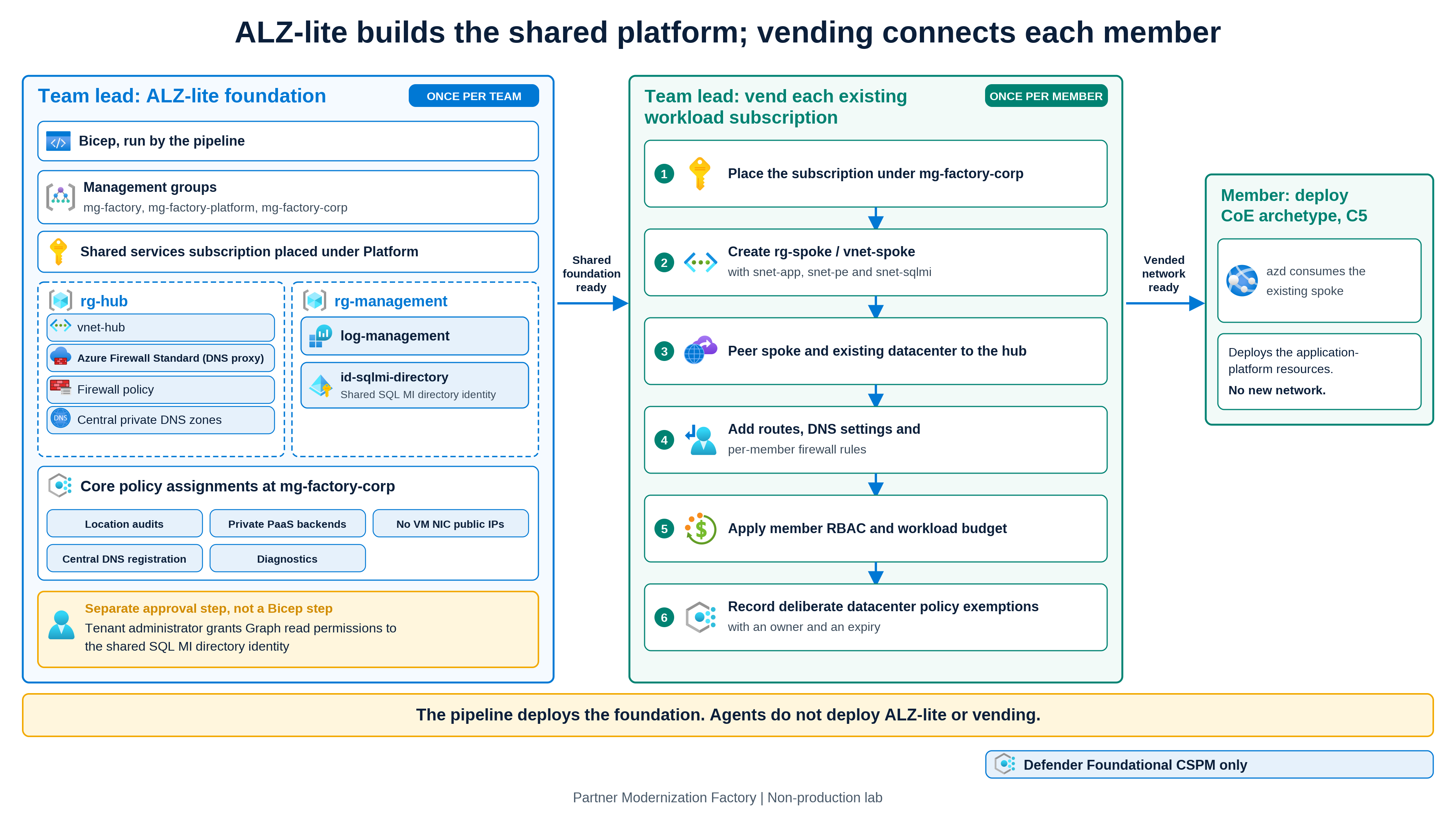
In Step 2, the team lead deploys the shared landing zone (ALZ-lite) once for the entire cohort from <event>-lead, then a Privileged Role Administrator grants Microsoft Graph directory-read permissions to id-sqlmi-directory. Run 2.1 from factory/ in <event>-lead; the administrator can run 2.2 from any machine without cloning the repository.
2.1 Deploy the foundation stage
Section titled “2.1 Deploy the foundation stage”When: At T-7, after Step 1 is complete—including a green whatif preflight run—and .local/roster.json is registered in <event>-lead via Initialize-PlatformPipeline.ps1 -RosterPath .local/roster.json.
Before dispatching foundation, have an authorized Entra operator bootstrap the reader group. Foundation grants the group control-plane Reader at the kit management group and all its descendants, including every vended workload subscription. It grants no Tenant Root or data-plane access. This is separate from the SQL MI Graph grant below.
From factory/ in <event>-lead, dispatch foundation:
gh workflow run platform.yml -f stage=foundation(Only if you updated .local/roster.json since Step 1, sync secrets with ./scripts/Initialize-PlatformPipeline.ps1 -RosterPath .local/roster.json and run gh workflow run platform.yml -f stage=whatif—batched as -f members=1-200, then -f members=201-300 above 256 members—waiting for whatif to finish green before dispatching foundation.)
foundation creates:
- Management groups
mg-factory,mg-factory-platform, andmg-factory-corpunder Tenant Root, with core governance policies assigned atmg-factory-corp. rg-managementin the shared services subscription containinglog-managementand the user-assigned managed identityid-sqlmi-directory.rg-hubin the shared services subscription containingvnet-hub, Azure Firewall (afw-hub/afwp-hub), and Private DNS zones.
Open the Actions tab on <event>-lead and approve the run if prompted. Done when foundation is green.
2.2 Grant Microsoft Graph read permissions
Section titled “2.2 Grant Microsoft Graph read permissions”Every student’s SQL Managed Instance uses id-sqlmi-directory in C7 so CREATE USER ... FROM EXTERNAL PROVIDER can resolve Microsoft Entra principals. This grant runs once per cohort after foundation completes and must be in place before Day 2 (C7).
Have someone holding Privileged Role Administrator (or Global Administrator) in the event tenant run Grant-SqlMiDirectoryRead.ps1 and verify with -WhatIf:
./scripts/Grant-SqlMiDirectoryRead.ps1 -SharedSubscriptionId '<shared-services-subscription-id>'./scripts/Grant-SqlMiDirectoryRead.ps1 -SharedSubscriptionId '<shared-services-subscription-id>' -WhatIfStandalone commands for a Privileged Role Administrator without the repo
The administrator does not need access to <event>-lead. On any computer with PowerShell 7.4 or later, Azure CLI, and Reader on the shared services subscription, activate Privileged Role Administrator in PIM if needed, sign in to the event tenant, and run:
az login --tenant '<tenant-id>'Invoke-WebRequest -Uri 'https://raw.githubusercontent.com/jonathan-vella/apex-factory-hackathon/main/scripts/Grant-SqlMiDirectoryRead.ps1' -OutFile Grant-SqlMiDirectoryRead.ps1./Grant-SqlMiDirectoryRead.ps1 -SharedSubscriptionId '<shared-services-subscription-id>'./Grant-SqlMiDirectoryRead.ps1 -SharedSubscriptionId '<shared-services-subscription-id>' -WhatIfThe -WhatIf verification must report all three Microsoft Graph application permissions (User.Read.All, GroupMember.Read.All, and Application.Read.All) as already granted. If the command stops with InteractionRequired or TokenCreatedWithOutdatedPolicies, run az logout, sign in again with az login --tenant '<tenant-id>', and repeat. See the ALZ-lite guide for background.
Done when -WhatIf confirms all three Microsoft Graph permissions are granted on id-sqlmi-directory.
If something breaks
Section titled “If something breaks”Inspect the failed job in <event>-lead under Actions, resolve the root cause, and re-run gh workflow run platform.yml -f stage=foundation. The foundation stage is idempotent and safe to repeat. Check Troubleshooting for common policy and permission errors.