
Step 4: Vending and collaborator invites (T-1)
Who: Team lead. Once Step 4 finishes, students complete Student onboarding (before Day 1). When: By T-1 (1 day before day one), after Step 2: Foundation and Step 3: Datacenters and Arc are green.
In Step 4, the team lead starts all cohort VMs, runs vending centrally from <event>-lead to connect every workload subscription to the shared hub, collects attendees’ GitHub usernames, invites each student as a Write (push) collaborator to their assigned <event>-student-<nn> repo, and sends each student their private Handoff Card.
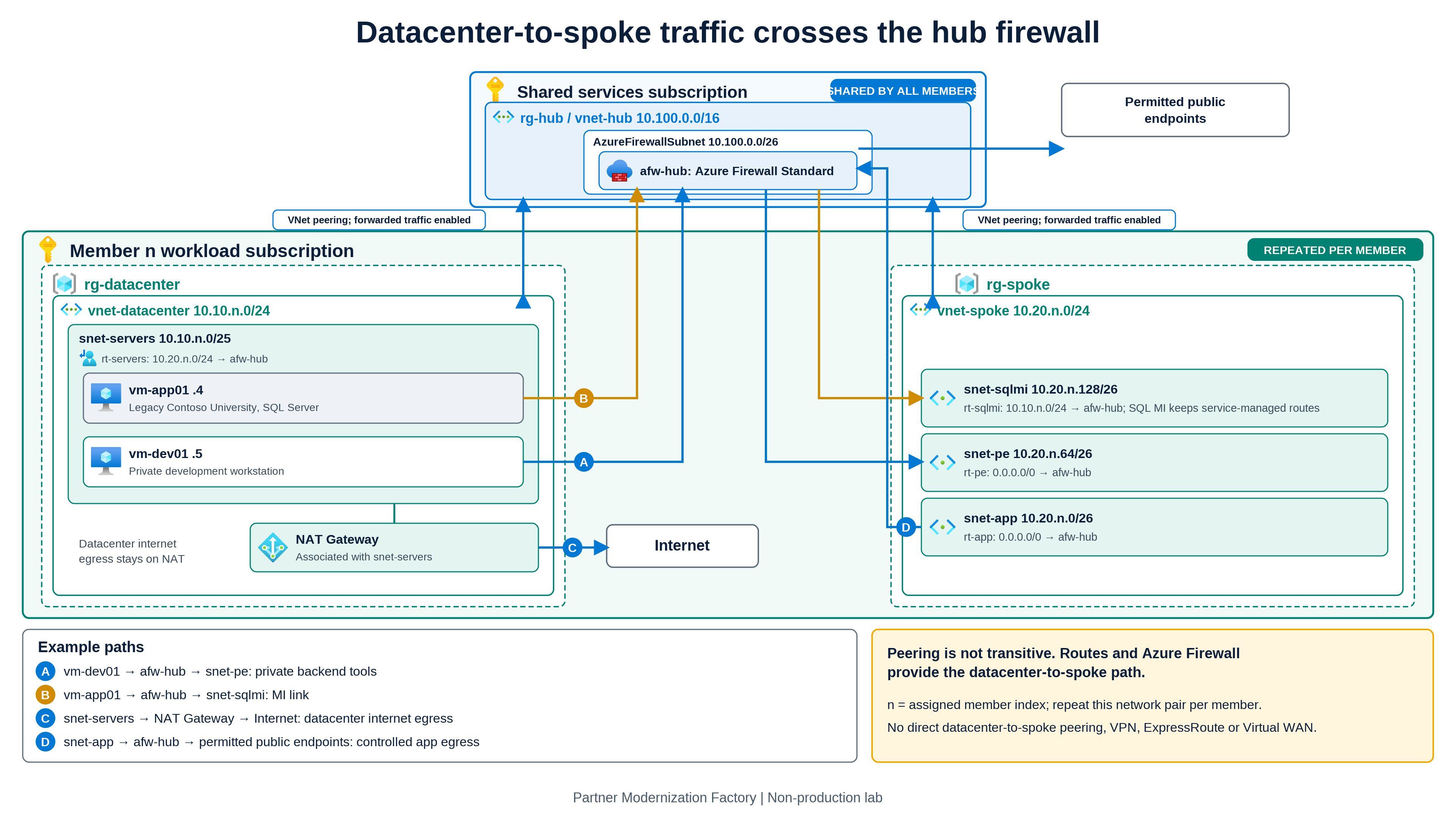
4.1 Start all datacenter VMs across the cohort
Section titled “4.1 Start all datacenter VMs across the cohort”Both vm-app01 and vm-dev01 must be running in every workload subscription before vending starts so vm-app01 reports Connected in Azure Arc and the pipeline can restart the VMs and run in-VM connectivity probes.
From factory/ in <event>-lead:
$roster = Get-Content .local/roster.json | ConvertFrom-Jsonforeach ($m in $roster) { az vm start -g rg-datacenter -n vm-app01 --subscription $m.subscriptionId --no-wait az vm start -g rg-datacenter -n vm-dev01 --subscription $m.subscriptionId --no-wait}Wait about 10 minutes after the VMs boot, then verify that every slot’s vm-app01 reports Connected in Azure Arc:
foreach ($m in $roster) { $arc = az connectedmachine show -g rg-datacenter -n vm-app01 --subscription $m.subscriptionId --query status -o tsv 2>$null [pscustomobject]@{ Index = $m.index; ArcStatus = $arc ?? 'MISSING' }}Do not start vending until every slot in the batch shows Connected.
4.2 Confirm Entra principal IDs and run vending
Section titled “4.2 Confirm Entra principal IDs and run vending”-
Confirm
memberPrincipalIdis populated for every slot in.local/roster.json. Vending grants each slot’smemberPrincipalId:Owneron that slot’s workload subscription,Readeron the shared services subscription, andManaged Identity Operatoronid-sqlmi-directoryinrg-management.
Before dispatching, have the group owner sync the reader group from the full private roster. The sync publishes the roster and verification to the lead pipeline. If a workload subscription changed, update the pipeline allowlist first with
Initialize-PlatformPipeline.ps1. -
Dispatch the
vendingstage.-
Up to 50 members:
Terminal window gh workflow run platform.yml -f stage=vending -
More than 50 members: Phase 1 vends spokes serially so
vnet-hubpeerings andafwp-hubrule collection groups never collide, which handles roughly 60 to 70 members inside GitHub Actions’ 6-hour (360-minute) single-job limit. Dispatchvendingin batches of up to 50 members—waiting for each batch to finish green before dispatching the next (and check the 90-RCG firewall limit in Scaling to larger cohorts):Terminal window gh workflow run platform.yml -f stage=vending -f members=1-50Once
1-50finishes green:Terminal window gh workflow run platform.yml -f stage=vending -f members=51-100
-
-
Monitor the three vending phases and retry if needed.
-
Phase 1 (serial readiness check and spoke vending): verifies
vnet-datacenterandvm-app01ArcConnected, moves the subscription undermg-factory-corp, buildsrg-spoke, peersvnet-spokeandvnet-datacentertovnet-hub, createsrcg-member-<n>, applies RBAC and the $500 budget, and sets Foundational CSPM. If Phase 1 stops at an unready slot, fix that slot and re-run the same batch (vendingis idempotent). -
Phase 2 (concurrent VM restart): restarts
vm-app01andvm-dev01across all vended slots in the batch so both VMs pick up the hub firewall’s DNS proxy. If Phase 2 fails, fix the cause and re-run the batch. -
Phase 3 (concurrent exemptions and connectivity probes): records datacenter policy exemptions where required and runs
Test-Connectivity.ps1. If Phase 3 reports failures only for specific indexes, fix the cause and re-runvendingfor just those indexes:Terminal window gh workflow run platform.yml -f stage=vending -f members=<indexes>
-
4.3 Invite students and send private Handoff Cards
Section titled “4.3 Invite students and send private Handoff Cards”Students use the private repositories created in Step 1, including the readiness evidence pushed in Step 3. After vending, the team lead completes the invitations and shares the Handoff Cards; students do not create new repositories.
-
Collect each attendee’s GitHub username. Ask every attendee for their GitHub handle (for example
octocat) and fill ingithubUsernameon their assigned slot infactory/.local/roster.json. -
Verify GitHub organization collaborator and branch settings. Before sending invites, confirm on your
<org>settings:- Outside collaborators are allowed if attendees sign in with personal or external partner GitHub accounts rather than organization-member accounts.
- Direct pushes to
mainare permitted for Write (push) collaborators on<event>-student-*repositories (no organization rule blocking pushes tomain).
-
Send Write collaborator invitations and generate final Handoff Cards. Run
Initialize-CohortRepos.ps1fromfactory/in<event>-lead(pass-CoachTeamSlugor-CoachUsernameif granting coach Read access):Terminal window ./scripts/Initialize-CohortRepos.ps1 `-RosterPath .local/roster.json `-TemplateRepository '<org>/<event>-student-template' `-RepoPrefix '<event>-student' `-CoachTeamSlug '<existing-coach-team-slug>'For every slot with
githubUsernameset, the script invites the student as a Write (push) collaborator on<org>/<event>-student-<nn>unless they already have Write access, and writes a complete private Handoff Card tofactory/.local/handoff/member-<index>.md. Ensure coaches have Read access to each student repository, using-CoachTeamSlug,-CoachUsername, or a separate grant. The readiness evidence pushed in Step 3 stays in each existing repository. -
Send each student their Handoff Card, assigned Entra sign-in details, and
labadminBastion password privately. Deliverfactory/.local/handoff/member-<index>.mdover a private direct message or encrypted channel—never in a public channel, issue, or commit—and send them the link to Student onboarding (before Day 1).
Done when vending is green for all 1..n slots, each student has a Write invitation or existing Write access and a private Handoff Card, and coaches have Read access to the student repositories.
Next: students complete Student onboarding (before Day 1).