
Step 4: Vending (T-1)
Path: Path A: Self-service teams (in a lead-provisioned cohort, follow Step 4: Vending and invites instead).
Who: Everyone starts their VMs; the Team lead runs the vending stage; Members save the shared services subscription ID.
When: By T-1 (1 day before day one), after Step 2: Foundation and every member’s Step 3: Datacenter and workstation are complete. See the stage timing table.
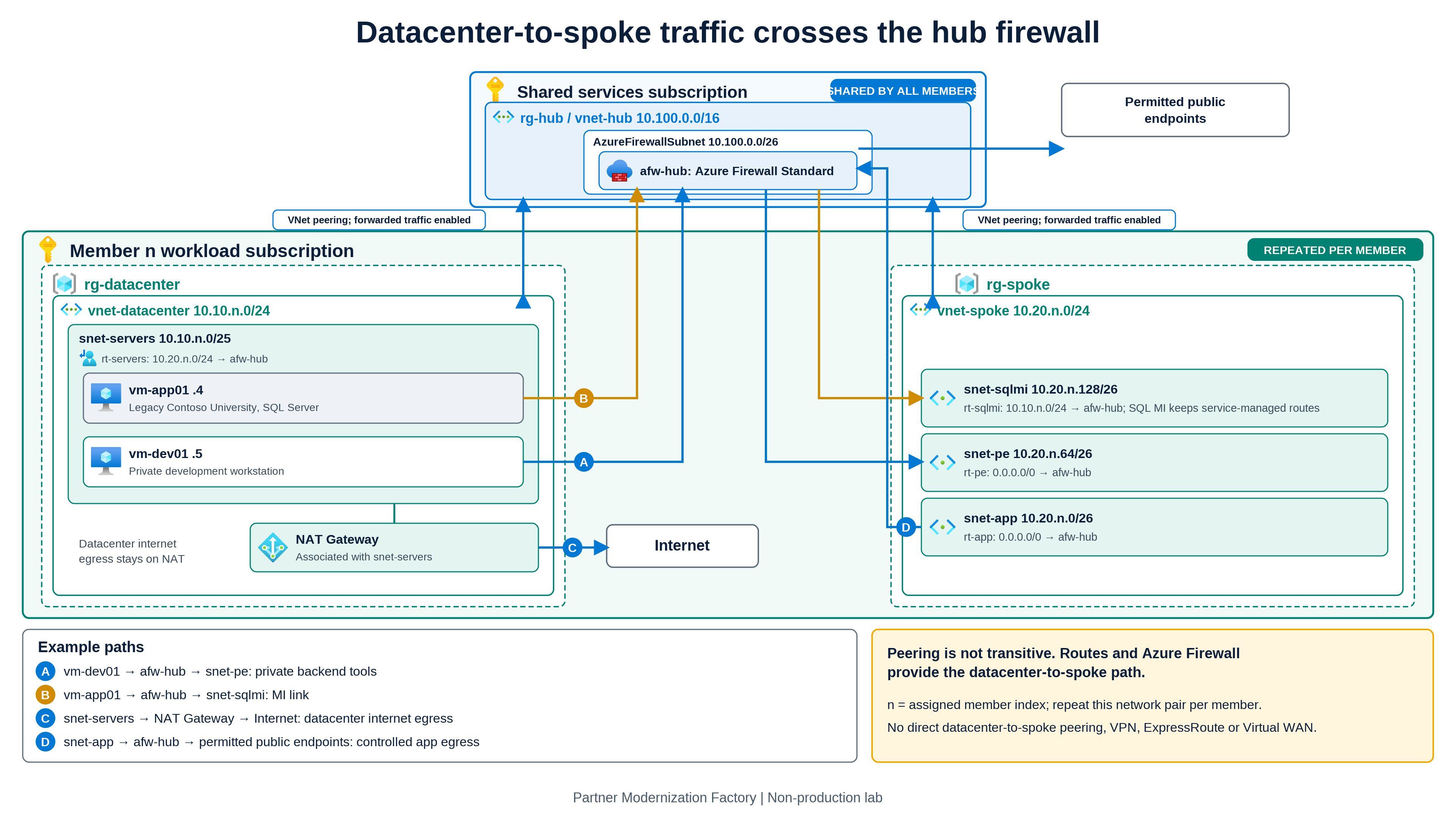
Vending places each workload subscription under mg-factory-corp, builds rg-spoke with subnets, route tables and NSGs, peers the spoke/datacenter to the hub, sets hub DNS, restarts both VMs, records exemptions if needed, and tests connectivity. It also creates the firewall rule collection group rcg-member-<n>, grants workload Owner and shared-services Reader/Managed Identity Operator as required, adds a subscription-scoped $500 budget with an 80% alert to the roster email, and sets Foundational CSPM only (paid Defender plans off). Verify these shared changes, not just rg-spoke.
4.1 Start both datacenter VMs (Everyone)
Section titled “4.1 Start both datacenter VMs (Everyone)”Before the team lead starts the vending stage, every member (including the team lead) must have vm-app01 and vm-dev01 running so the pipeline can restart them and run the in-VM connectivity probes.
From Azure Cloud Shell (or C:\src\<your-repo>\factory on vm-dev01):
$s = Get-Content .local/settings.json | ConvertFrom-Jsonaz vm start -g rg-datacenter -n vm-app01 --subscription $s.subscriptionIdaz vm start -g rg-datacenter -n vm-dev01 --subscription $s.subscriptionIdIf you have an open Bastion session to vm-dev01, save your work: the VM restart during vending will disconnect your session.
After starting the VMs, allow about 10 minutes and check Azure Arc > Machines > vm-app01 > Connected before telling the team lead you are ready. VM Running alone is not the vending readiness check.
4.2 Run the vending stage (Team lead)
Section titled “4.2 Run the vending stage (Team lead)”Before dispatching vending, the designated Entra group owner syncs the reader group from the full private roster. The stage rejects missing or stale roster verification, even when vending only a batch. From factory/ in the team lead’s repository, start the stage:
gh workflow run platform.yml -f stage=vendingOpen the Actions tab on GitHub and approve the run if asked. The stage runs in three phases:
- Automatic readiness check and spoke vending (one member at a time): for each member in
roster.json, the pipeline verifies thatvnet-datacenterexists andvm-app01is connected to Azure Arc (Connected), then runsDeploy-Vending.ps1. If a member has not finished Step 3, the stage stops at the first unready member. Earlier members are vended but not restarted, exempted or probed; later members are not vended. - Parallel VM restart: restarts
vm-app01andvm-dev01for all vended members at once so they pick up the hub firewall’s DNS proxy. - Parallel exemptions and connectivity probes: runs
New-DatacenterExemptions.ps1andTest-Connectivity.ps1for every vended member.
If phase 1 stops at an unready member, or phase 2 fails while restarting VMs, fix the cause and re-run vending for all members. It is safe to repeat. For large cohorts (more than about 60 members), run vending in index batches such as -f members=1-50 and -f members=51-100—waiting for each batch to finish green before dispatching the next—so each job stays within GitHub Actions’ 360-minute limit. If phase 3 names members whose exemptions or connectivity probes failed, fix the cause and re-run only for those named indexes:
gh workflow run platform.yml -f stage=vending -f members=<n>When the run is green, post “vended” in your team’s private channel along with the shared services subscription ID so your teammates can save it in 4.3.
4.3 Save the shared services subscription ID (Members)
Section titled “4.3 Save the shared services subscription ID (Members)”Who: Team members (2..n) only—the team lead already saved sharedSubscriptionId in Step 1.4. Once the team lead confirms that Step 4 is green and shares the shared services subscription ID in your private team channel, each team member saves it in C:\src\<your-repo>\factory\.local\settings.json on vm-dev01:
cd C:\src\<your-repo>\factory./scripts/Initialize-Settings.ps1 -SharedSubscriptionId '<shared-services-subscription-id>'Re-running Initialize-Settings.ps1 with -SharedSubscriptionId keeps your existing tenantId, subscriptionId, memberIndex, location, and suffix unchanged.
Done when vending is green for every member on the roster and .local/settings.json holds sharedSubscriptionId.
If something breaks
Section titled “If something breaks”Check the vending and DNS entries in Troubleshooting and share the failing phase with your team lead.
Next: on Day 1 at 08:30, join the tech lead’s 30-minute hackathon introduction, then start C1: Define the opportunity at 09:00.