
C5: Deploy the CoE archetype with APEX
- Day 1
- Member challenge
- 90 min
Background
Section titled “Background”The modernized app needs somewhere to run. The CoE archetype is that place: App Service, a container registry, SQL Managed Instance, Blob, Service Bus, Key Vault and Application Insights, built to the landing zone’s policies. In C5 you adapt it to your spoke with the APEX skill and deploy it with azd.
Business context. Priya, the head of IT operations, wants every environment built the same way, from code, so nobody rebuilds one by hand again. C5 deploys the platform the app will run on.
Business outcome. Repeatable provisioning. The platform is deployed from the repo and documented as built, and every data service is private.
Objective. Be able to adapt and deploy a reference platform into a governed spoke, and check that it is private and policy-compliant.
Time and scope. Day 1, 13:15 demo (13:45 hands-on), 90 min (30 min demo + 60 min hands-on), Member. C6 starts at 14:45. The 60 minutes are your hands-on time. The waits aren’t: azd provision takes about 20 minutes (22 min 59 s on 2026-10-08 and 20 min 2 s on 2026-10-20 in the build tenant) and As-Built about 30 minutes (17:11 to 17:41 UTC on 2026-10-08). Use both waits to start C6.
Challenge
Section titled “Challenge”Starting point. The spoke your team lead vended for you at Step 4 (T-1), with your Entra object ID (C2 tested its policy guardrails and connectivity). C4’s target-state decisions. Your own repo (C:\src\<your-repo> on main on vm-dev01).
Fixed by the kit. The archetype’s shape and its Bicep template in infra/bicep/university/. The deployment uses azd (the Azure Developer CLI, preinstalled on vm-dev01).
You decide. Nothing about the shape. You review the preview before you deploy.
What this deploys
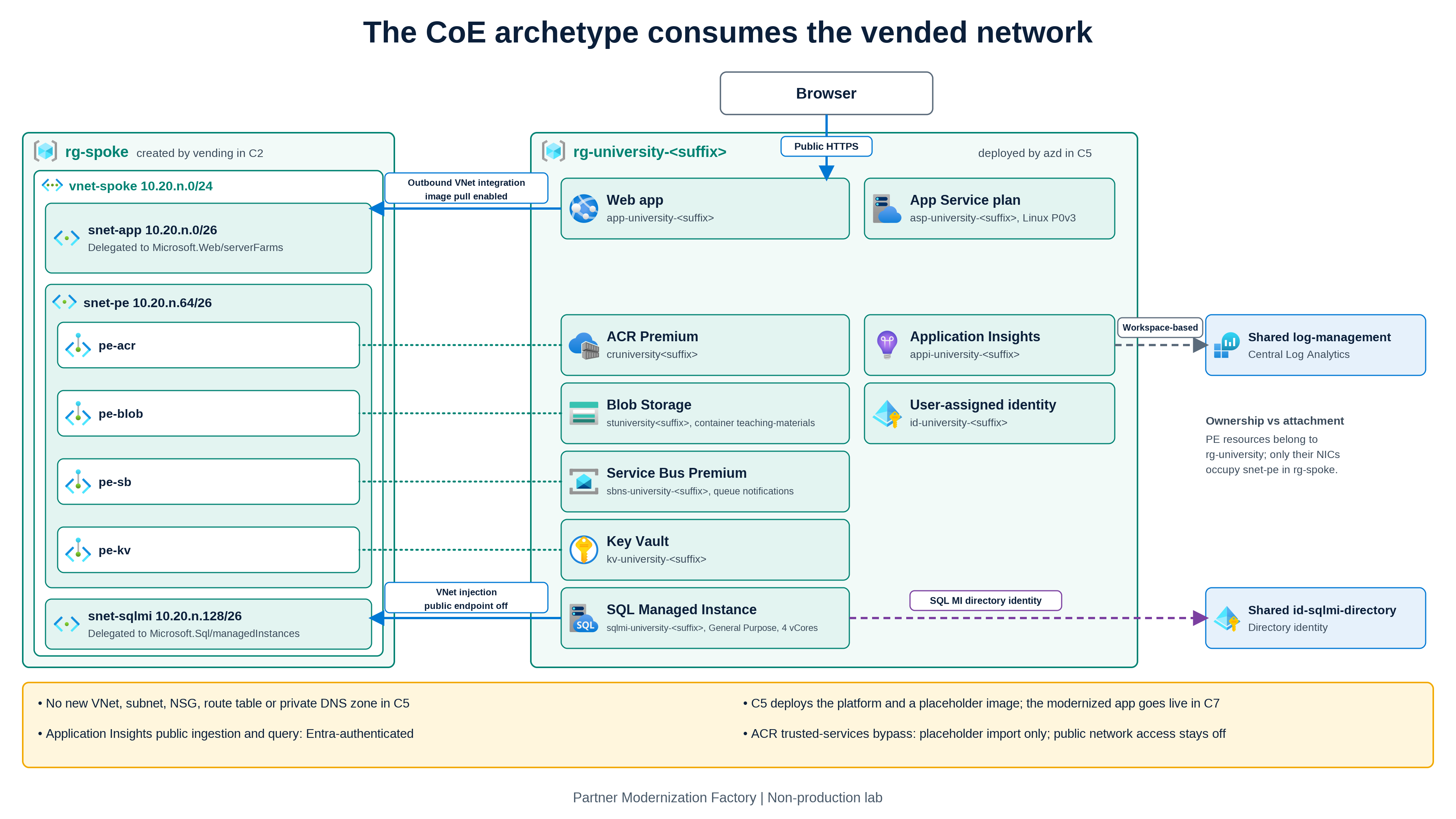
Section titled “What this deploys”The highlighted parts are what C5 adds to the spoke that vending created at T-1: the resources in rg-university-<suffix>, their private endpoints in snet-pe, the web app’s VNet integration and the SQL Managed Instance in snet-sqlmi.
Text version of the diagram
- Management groups:
mg-factorycontainsmg-factory-platform(the shared services subscription) andmg-factory-corp(every member's workload subscription and the core policies). C2 verifies them. - Shared services subscription, one per team (C2). Resource group
rg-hubholdsvnet-hub(10.100.0.0/16) with Azure Firewall Standardafw-hub(10.100.0.4, DNS proxy, rules inafwp-hub), and the four central private DNS zones for Blob, Service Bus, ACR and Key Vault. Resource grouprg-managementholds the Log Analytics workspacelog-managementand the identityid-sqlmi-directory, which every member's SQL Managed Instance uses. - Member workload subscription, one per member (n ≥ 1: 10.10.n.0/24 and 10.20.n.0/24 for n = 1 to 255, or 10.(127 + floor(n/256)).(n%256).0/24 in 10.128.0.0/10 and 10.(191 + floor(n/256)).(n%256).0/24 in 10.192.0.0/10 for n ≥ 256). Resource group
rg-datacenter(built in the readiness check) holdsvnet-datacenter(10.10.n.0/24). Subnetsnet-servers(10.10.n.0/25) hasvm-app01(10.10.n.4, the legacy app and SQL Server) andvm-dev01(10.10.n.5, your workstation).AzureBastionSubnet(10.10.n.192/26) has Bastion Standardbas-datacenter. A NAT gatewaynat-datacenterprovides outbound internet. - Resource group
rg-spoke(vended at T-1) holdsvnet-spoke(10.20.n.0/24) withsnet-app(10.20.n.0/26, web app VNet integration),snet-pe(10.20.n.64/26, private endpoints) andsnet-sqlmi(10.20.n.128/26, SQL Managed Instance). - Resource group
rg-university-<suffix>(C5) holds the archetype: an App Service plan (P0v3) and web app with a public HTTPS front end, a container registry, a SQL Managed Instance, Blob Storage (containerteaching-materials), Service Bus (queuenotifications), Key Vault, Application Insights and the web app's managed identity. Registry, storage, Service Bus and Key Vault are reached through private endpoints insnet-pe. Application Insights ingestion stays public, allowed by a firewall rule. - Network flows (C2): the datacenter and the spoke each peer with the hub and send traffic through
afw-hubby user-defined routes. Both VNets useafw-hubas DNS server. - C7: the MI link runs from
vm-app01throughafw-hubtosnet-sqlmion TCP 5022 and 11000–11999. The datacenter and the spoke aren't peered with each other. - C7 and C8: from
vm-dev01you reach the private endpoints (TCP 443 and 5671) and the SQL Managed Instance (TCP 1433 and 11000–11999) throughafw-hub.
Requirements
Section titled “Requirements”-
Watch the coach’s demo of the archetype’s shape and the
/apex-adapt-archetypeflow. -
Confirm the archetype is in your repo. vm-dev01 · C:\src\<your-repo> In
C:\src\<your-repo>onvm-dev01, confirmagent-output/university/,infra/bicep/university/and.github/skills/apex-adapt-archetype/exist at the repo root. If they don’t, run./factory/archetype/Import-Archetype.ps1fromC:\src\<your-repo>.Run
git status --short -- infra/bicep/universitybefore making C5 edits. It must print nothing: if C2’s insecureregistry.bicepedit remains, restore that file withgit restore --source=HEAD -- infra/bicep/university/modules/registry.bicep. -
Run the
/apex-adapt-archetypeskill onvm-dev01: vm-dev01 · C:\src\<your-repo> Copilot Chat (Agent)- Sign in to
azdfirst, in PowerShell 7 (pwsh):azd auth login --use-device-code.azdkeeps its own sign-in, separate fromaz login, and the skill stops without it. Skip this only ifazdalready says you’re signed in. - Open Copilot Chat, set the mode to Agent (the built-in one, not
01-Orchestrator) and type/apex-adapt-archetype. It reads your tenant ID, subscription ID and suffix fromfactory/.local/settings.jsonand asks you to confirm them. It checks that a spoke is already vended, runs a lightweight live governance check, creates anazdenvironment named after your suffix, and stops atazd provision --preview.
Done when the skill shows the preview: its output ends with a list of the resources
azdwould create, and no error. Review the resource names for your suffix before deploying. - Sign in to
-
Review the preview, then deploy for real. vm-dev01 · C:\src\<your-repo>\infra\bicep\university (pwsh) Review the preview the skill showed in Copilot Chat, then switch from chat to a PowerShell 7 (
pwsh) terminal onvm-dev01.Before you deploy: SQL MI licence check. The template defaults to Azure Hybrid Benefit. If you do not have eligible SQL Server licences with Software Assurance or subscription rights, set
var licenseType = 'LicenseIncluded'in the workinginfra/bicep/university/modules/sql-mi.bicepbefore preview/deployment. Read Azure Hybrid Benefit and the archetype README.Run on: PowerShell 7 on
vm-dev01. Preflight exports process variables needed byazd. Keep this same shell open for any new preview and for deployment:vm-dev01 — C:\src<your-repo>\infra\bicep\university (pwsh) cd C:\src\<your-repo>\infra\bicep\university$s = Get-Content ..\..\..\factory\.local\settings.json | ConvertFrom-Json./scripts/preflight.ps1 -TenantId $s.tenantId -SubscriptionId $s.subscriptionId -Suffix $s.suffixIf it fails: Stop and resolve the preflight error before continuing. If inputs or templates changed since the skill’s preview (including the licence choice), rerun
azd provision --previewin that same shell and review the new output. Otherwise use the skill’s reviewed preview; don’t repeat it.Run
azd provisionin that same shell only when you accept the reviewed changes. Provisioning waits until the SQL Managed Instance is created: about 20 minutes, so keep that terminal open. You can start C6 in another VS Code chat while it runs.Expected result:
azd provisionreturns without an error andrg-university-<suffix>exists. -
Run As-Built. vm-dev01 · Copilot Chat (08-As-Built) When
azd provisionreturns, in Copilot Chat inC:\src\<your-repo>, pick the08-As-Builtagent in the chat input area and sendDocument the deployed state of the university project.Ifazd’s output printed anapex-recall ...command to run first, run that line in the terminal whereazdran. It takes about 30 minutes: continue C6 meanwhile. Done when theagent-output/university/07-*.mdAs-Built suite exists (for example07-documentation-index.md). -
Confirm the deployment and commit
agent-output/university/, vm-dev01 · C:\src\<your-repo>\factory (pwsh) with your suffix:vm-dev01 — C:\src<your-repo>\factory (pwsh) cd C:\src\<your-repo>\factory$s = Get-Content .local/settings.json | ConvertFrom-Jsonaz resource list -g rg-university-$($s.suffix) -o tableaz storage account show -g rg-university-$($s.suffix) -n stuniversity$($s.suffix) --query publicNetworkAccess -o tsvaz keyvault show -n kv-university-$($s.suffix) --query properties.publicNetworkAccess -o tsvaz servicebus namespace show -g rg-university-$($s.suffix) -n sbns-university-$($s.suffix) --query publicNetworkAccess -o tsvaz acr show -n cruniversity$($s.suffix) --query publicNetworkAccess -o tsv$id = az identity show -g rg-university-$($s.suffix) -n id-university-$($s.suffix) --query principalId -o tsvaz role assignment list --assignee $id --all -o tableCommit the generated
agent-output/university/06-deployment-summary.mdand07-*.mdfiles (after redacting any raw subscription or tenant GUIDs) onmain:vm-dev01 — C:\src<your-repo> (pwsh) cd C:\src\<your-repo>git pull --rebasegit add agent-output/universitygit commit -m "docs: C5 archetype deployment summary and as-built"git pushDone when there are no public endpoints other than the web app’s front end and Application Insights ingestion (the four
publicNetworkAccessvalues areDisabled), every resource name follows the convention in the naming and IP plan, and the web app’s managed identity (id-university-<suffix>) holds six roles: AcrPull, Storage Blob Data Contributor, Azure Service Bus Data Sender, Azure Service Bus Data Receiver, Key Vault Secrets User and Monitoring Metrics Publisher.
Success criteria
Section titled “Success criteria”To complete this challenge, check your work in C:\src\<your-repo> on main:
-
agent-output/university/06-deployment-summary.mdand theagent-output/university/07-*.mdAs-Built suite committed onmain(with any subscription, tenant and object IDs redacted). -
az resource list -g rg-university-<suffix> -o tableshowing every expected resource with private endpoints andpublicNetworkAccessset toDisabledon data backends. - Outcome check: show Priya that the platform came from the repo: the deployment summary and the As-Built record match what is in the resource group.
For technical blockers, check Troubleshooting before asking your coach.
/apex-adapt-archetype won’t find a vended spoke
It looks for rg-spoke, vnet-spoke, snet-app, snet-pe and snet-sqlmi by the naming convention in the naming and IP plan. Confirm Step 4: Vending and C2 requirement 3’s connectivity check passed before retrying. If the spoke is missing, your team lead runs the vending stage for you; members can’t.
Preflight says the managed identity “cannot be read” or lacks the assign permission
Your vending ran without your Entra object ID, so you don’t have Managed Identity Operator on id-sqlmi-directory. Only the team lead can fix it: ask them to rerun Step 4: Vending for you after checking the private roster. This message comes from the archetype’s own ./scripts/preflight.ps1, not the readiness check’s preflight.
Preflight says a SQL virtual cluster holds snet-sqlmi
A managed instance was deleted from your spoke earlier, and Azure releases its virtual cluster later (this can take hours). Wait and retry, and ask your coach before you delete anything.
azd provision --preview looks incomplete
The preview only lists resource types azd has display names for: it’s expected to omit the SQL Managed Instance, the managed identity, role assignments, diagnostic settings and the maintenance schedule even though they’re all in the template and will be created.
If you need to start over
To redeploy, run /apex-adapt-archetype and then azd provision again, as in requirements 3 and 4. The deploy.ps1 fallback works without the agent or azd: see the APEX guide.