
Step 1: Repo and preflight (T-14)
Who: Everyone (team lead included), plus the Team lead collects the team roster. When: By T-14 (14 days before day one). About 30 to 45 minutes in Azure Cloud Shell.
Complete this step first. It gives you a private repository with the kit on main, a signed-in az and gh, your .local/settings.json file, and a passing whatif preflight. GitHub Actions runs workflows only from the default branch, so the kit must be merged to main before anything deploys. Check that you have the accounts and access from Requirements first. If anything blocks you, contact your designated team lead first (no coach is on duty before day one; pre-hackathon support is best-effort).
How you work
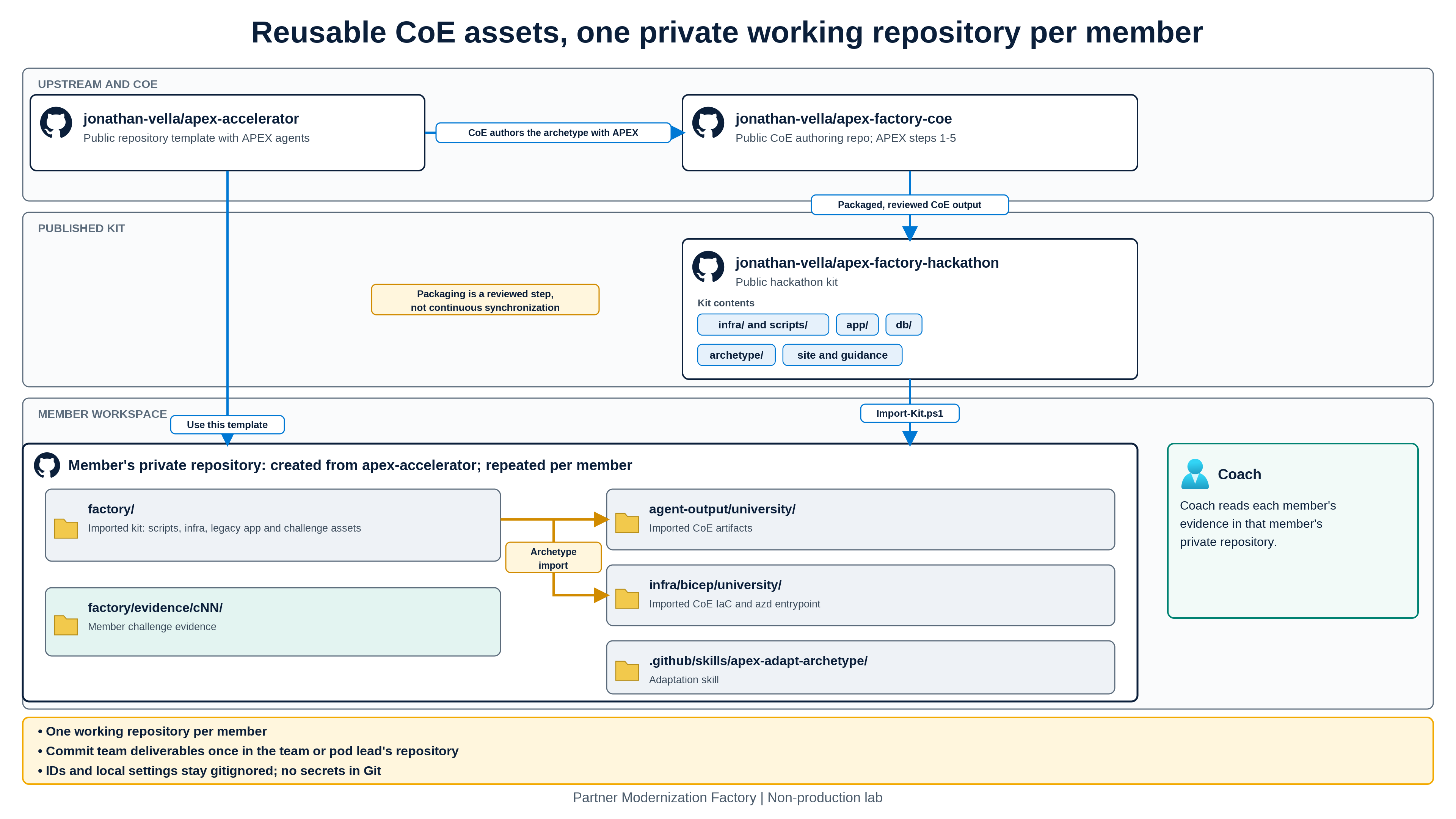
Section titled “How you work”- One repo of your own. Create a private GitHub repo from the
apex-acceleratortemplate and use it throughout the event. Usemainfor challenge work. The template supplies the APEX agents, which appear in Copilot Chat’s agent picker. - Azure Cloud Shell for Step 1. Import the kit and set up the pipeline in Azure Cloud Shell (PowerShell) in your browser. You get your
vm-dev01workstation in Step 3 (T-3). - One import. A single command (
Import-Kit.ps1) copies the kit intofactory/, pre-populatesfactory/evidence/, and placesapp/ContosoUniversity,.github/modernization/,.github/skills/, and the CoE archetype (infra/bicep/university/) at the repo root. - One workstation (
vm-dev01) for all challenges. Oncevm-dev01is deployed in Step 3: Datacenter and workstation, you clone your repo toC:\src\<your-repo>onmainand run 100% ofC1toC10there. - Working artifacts live in
factory/evidence/onmain. Team deliverables (C1,C4,C10) are committed once in the team/pod lead’s repo.
1.1 Create your repo (Everyone)
Section titled “1.1 Create your repo (Everyone)”-
Create the repo. Open the
apex-acceleratortemplate, choose Use this template > Create a new repository, set the owner to your partner org, and make it Private. Add your team lead and any coach accounts your event owner publishes as collaborators (Settings > Collaborators). -
Open Azure Cloud Shell and sign in to GitHub. Open Azure Cloud Shell in your browser, switch the shell picker to PowerShell, and sign in to GitHub:
Terminal window gh auth login --hostname github.com --git-protocol https --webgh auth setup-git$u = gh api user | ConvertFrom-Jsongit config --global user.name ($u.name ?? $u.login)git config --global user.email "$($u.id)+$($u.login)@users.noreply.github.com" -
Clone your repository in Cloud Shell.
Terminal window mkdir -p ~/srccd ~/srcgit clone https://github.com/<your-org>/<your-repo>.gitcd <your-repo>
Ignore the template’s own README
Your new repo opens on the template’s README and its Quick Start. Follow this page instead. Don’t run npm run setup, change the Actions pull request permission, or run Weekly Maintenance/Governance Policy Baseline: the kit doesn’t use them. Ignore the template’s failed Monday scheduled runs.
Done when pwd in Azure Cloud Shell shows ~/src/<your-repo>.
1.2 Import the kit
Section titled “1.2 Import the kit”-
Import. In Azure Cloud Shell, at the root of
~/src/<your-repo>, run:Terminal window curl -fsSLO https://raw.githubusercontent.com/jonathan-vella/apex-factory-hackathon/main/scripts/Import-Kit.ps1pwsh ./Import-Kit.ps1rm Import-Kit.ps1This creates
factory/(withfactory/evidence/templates pre-populated) and importsapp/ContosoUniversity,.github/modernization/,.github/skills/, and the CoE archetype (agent-output/university/andinfra/bicep/university/) into the repo root. -
Commit and push the import on a branch.
Terminal window git switch -c feat/import-kitgit add -Agit commit -m "chore: import the factory kit"git push -u origin feat/import-kit
Done when ls factory lists scripts, infra, app, db, templates, evidence and archetype, ls app lists ContosoUniversity, and your feat/import-kit branch is on GitHub.
If the import fails
- The import refuses to overwrite an existing
factory/unless you add-Force. Repeat the three lines and passpwsh ./Import-Kit.ps1 -Force.-Forcepreservesfactory/.local/, your archetype work, andapp/ContosoUniversity(pass-ReplaceArchetypeor-ReplaceApponly if you want to overwrite them).
1.3 Merge your import
Section titled “1.3 Merge your import”Your import is on the feat/import-kit branch. Merge it now so main holds the kit and .github/workflows/platform.yml.
-
Merge the branch with
gh(or in the GitHub web UI under Pull requests):Terminal window gh pr create --base main --head feat/import-kit --title "chore: import the factory kit" --body "Import the Partner Modernization Factory kit."gh pr merge --merge --delete-branch -
In Cloud Shell, bring
mainup to date:Terminal window git switch maingit pull
Done when factory/ and app/ContosoUniversity/ are visible on main on GitHub and git branch --show-current prints main.
Assign member indexes before 1.4 (Team lead)
Section titled “Assign member indexes before 1.4 (Team lead)”Before anyone creates settings in Step 1.4, the team lead assigns each member a distinct index and shares it privately. Scripts accept positive whole-number member indexes starting at 1, with the team lead as 1. Members must use the index their team lead assigns, not choose their own.
From now on, all your work is on main. Once vm-dev01 is deployed at T-3, you work in C:\src\<your-repo> on main on vm-dev01 (git pull --rebase before pushing). Team deliverables (C1, C4, C10) are committed once in the team/pod lead’s repo and shared in the team channel; member deliverables (C3, C5–C9) are committed in your own repo.
1.4 Sign in and create settings
Section titled “1.4 Sign in and create settings”-
Verify your Azure subscription in Cloud Shell. Find your tenant ID (Azure portal, Microsoft Entra ID > Overview) and your subscription ID (Subscriptions).
Terminal window az account set --subscription '<subscription-id>'az account show --output tableCheck that
az account showprints your workload subscription, and compare its subscription ID with the portal, not the name: the CLI caches names. -
Create your settings file. Run it from
factory/with the unique index your team lead assigned before this step:Terminal window cd ~/src/<your-repo>/factory./scripts/Initialize-Settings.ps1It asks for your tenant ID and workload subscription ID, your member index, your location (press Enter for
swedencentral) and the shared services subscription. It shows the subscription name it is about to save: answerYonly when that name is yours. Note your generated 6-charactersuffix($s.suffix)—you will pass-Suffix <suffix>when you set upvm-dev01in Step 3.3. -
Check your vCPU quota.
Terminal window $s = Get-Content .local/settings.json | ConvertFrom-Jsonaz vm list-usage --location $s.location --output tableFor the rows
Total Regional vCPUsandStandard DASv6 Family vCPUs,CurrentValue + 16must be no larger thanLimit. If not, ask for a quota increase under Usage + quotas and tell your team lead.
Done when Get-Content .local/settings.json shows tenantId, subscriptionId, location, memberIndex and suffix, and the quota check passes. factory/.local/ is git-ignored, so your IDs never go to GitHub.
About the settings questions
- Member index: your team lead assigns you a positive whole-number member index unique within your team, starting at
1with the team lead as1. Ask your team lead if you don’t have one, and don’t pick your own. It isn’t the six-character suffix the script generates. Later pages show these as$s.memberIndexand$s.suffix, read fromfactory/.local/settings.json. - Shared services subscription, members: press Enter to skip it for now. You can add it in Step 4: Vending when your team lead shares it (
./scripts/Initialize-Settings.ps1 -SharedSubscriptionId '<shared-services-subscription-id>'). Re-running never changes your other values. - Shared services subscription, team lead: enter it now. The script prints its name on a
Shared:line: check it is your shared services subscription and not another one you own. - Wrong subscription name:
az account list --refresh --output tableupdates the cached names.Initialize-Settings.ps1can’t tell a mistyped but valid ID from a real one, so read the name it shows.
1.5 Send your roster values and set up the pipeline
Section titled “1.5 Send your roster values and set up the pipeline”Members (other than the team lead):
-
Send these four values privately to your team lead (a direct message or private team channel, never in a repo, issue, or pull request):
- your workload subscription ID (
$s.subscriptionId) - your member index (
$s.memberIndex) - your Entra object ID (
az ad signed-in-user show --query id -o tsv) - your work email
- your workload subscription ID (
-
Set up the member pipeline in your repo (run from
factory/):Terminal window ./scripts/Initialize-PlatformPipeline.ps1 -Profile MemberOn a private repo it may warn that write access is the gate. That is expected when required reviewers are unavailable. GitHub’s current environment-plan guidance conflicts with the owner’s reported Free-plan private-repo test; verify Step 1.5 in your partner organization before T-14. See Requirements and check the setup any time with
./scripts/Test-PipelineSetup.ps1 -Profile Member.
Team lead:
-
Use the distinct team member indexes you assigned and shared before Step 1.4: positive whole-number member indexes starting at
1, with you as1. Collect the four values above from every member, yourself included. -
Save
factory/.local/roster.json(git-ignored) with one row per member:[{ "index": 1, "subscriptionId": "<workload-subscription-id>", "memberPrincipalId": "<entra-object-id>", "budgetEmail": "<email>" }] -
Make sure your account has Owner at Tenant Root (a Global Administrator must elevate access to grant it) and Owner on the shared services subscription.
-
Set up the lead pipeline in your repo (run from
factory/):Terminal window ./scripts/Initialize-PlatformPipeline.ps1 -RosterPath .local/roster.jsonA repo has one profile: do not run
-Profile Memberin the team lead’s repo. To add or swap a member later, edit.local/roster.json, run this command again if workload subscriptions changed, and runSync-FactoryReaderGroup.ps1 -Mode Syncbefore vending.
Done when Initialize-PlatformPipeline.ps1 reports its checks as passed.
Do not run the foundation stage yet. The team lead runs it at Step 2 (T-7), after the Step 1 preflight.
1.6 Run the T-14 preflight and manual checks
Section titled “1.6 Run the T-14 preflight and manual checks”The whatif stage checks your subscription and registers missing Azure resource providers. See the stage timing table for the estimate, including time for provider registration to propagate.
-
Run the
whatifstage fromfactory/:Terminal window gh workflow run platform.yml -f stage=whatif -
Open the Actions tab on GitHub and approve the run if asked.
-
Fix every FAIL the run log reports. If resource providers were just registered, wait 10 to 15 minutes and run
gh workflow run platform.yml -f stage=whatifagain. -
Confirm every row in the manual checks table below before T-14.
Team lead: Step 1.5 verifies that your account can assign Owner at Tenant Root when it creates the pipeline identity. The later whatif run checks the pipeline identity’s Tenant Root and shared-services permissions, plus every member in roster.json. Treat a warning on the Management groups row as a blocker and resolve it before Step 2 (T-7).
| # | Check | How to verify | Preflight row |
|---|---|---|---|
| 1 | Copilot seat and organization policy | Confirm your GitHub account has an active Copilot seat and your organization allows Copilot Chat, custom agents (01-Orchestrator, 08-As-Built, Upgrade), and MCP servers (verified on vm-dev01 in Step 3.3). | GitHub Copilot |
| 2 | Azure Cloud Shell works | You can run az version, pwsh --version, and gh --version in Azure Cloud Shell. | Not a MANUAL row |
| 3 | One subscription per member | Confirm with your team lead that no other member uses yours. | Not a MANUAL row |
| 4 | Your roles match your kit role | Team lead: Owner at Tenant Root, Owner on the shared services subscription, and Owner on their own workload subscription. Members: Owner on your own workload subscription. Tenant Root Owner must be in place for pipeline setup by T-14. | Not a MANUAL row |
| 5 | MFA is registered | Sign in to the Azure portal and confirm your MFA method works. | MFA |
| 6 | You can create private repos in the partner’s GitHub org | You did this when you created your repo above. Private-repo Actions uses included compute first; the repo owner is billed for additional usage. Check the organization owner’s Billing & Licensing page, budget and payment method. | GitHub repositories |
| 7 | Azure licensing | Confirm Windows Server AHB eligibility for vm-app01 or follow the AHB rule. Separately, confirm your per-user Windows 11 license grants rights to run Windows 11 on Azure for vm-dev01; the preflight input does not cover it. | Azure Hybrid Benefit |
Done when the whatif run is green and every manual check is confirmed.
The automated preflight’s GO is in the job log, not the run summary. WARN rows do not prevent GO; they do not waive your manual checks.
Next: the team lead continues to Step 2: Foundation and Graph grant (T-7). Members continue to Step 3: Datacenter and workstation (T-3).