
Step 3: Datacenters and Arc (T-3)
Who: Team lead. Students still have nothing to run at T-3.
When: By T-3 (3 days before day one). About 35 to 60 minutes per concurrent wave of MAX_PARALLEL member jobs (default 20).
In Step 3, the team lead dispatches the member stage from <event>-lead across all n workload subscriptions. Each member job creates rg-datacenter (vm-app01, vm-dev01, Bastion Standard, and NAT Gateway), runs Test-Datacenter.ps1 before Azure Arc disables guest run commands, and—only when every check passes—onboards vm-app01 and its SQL Server 2022 instance to Azure Arc.
Datacenter resources start billing at Step 3 and continue until teardown at T+2 (Bastion, NAT Gateway, and Premium disks continue to bill while VMs are deallocated; see Cost).
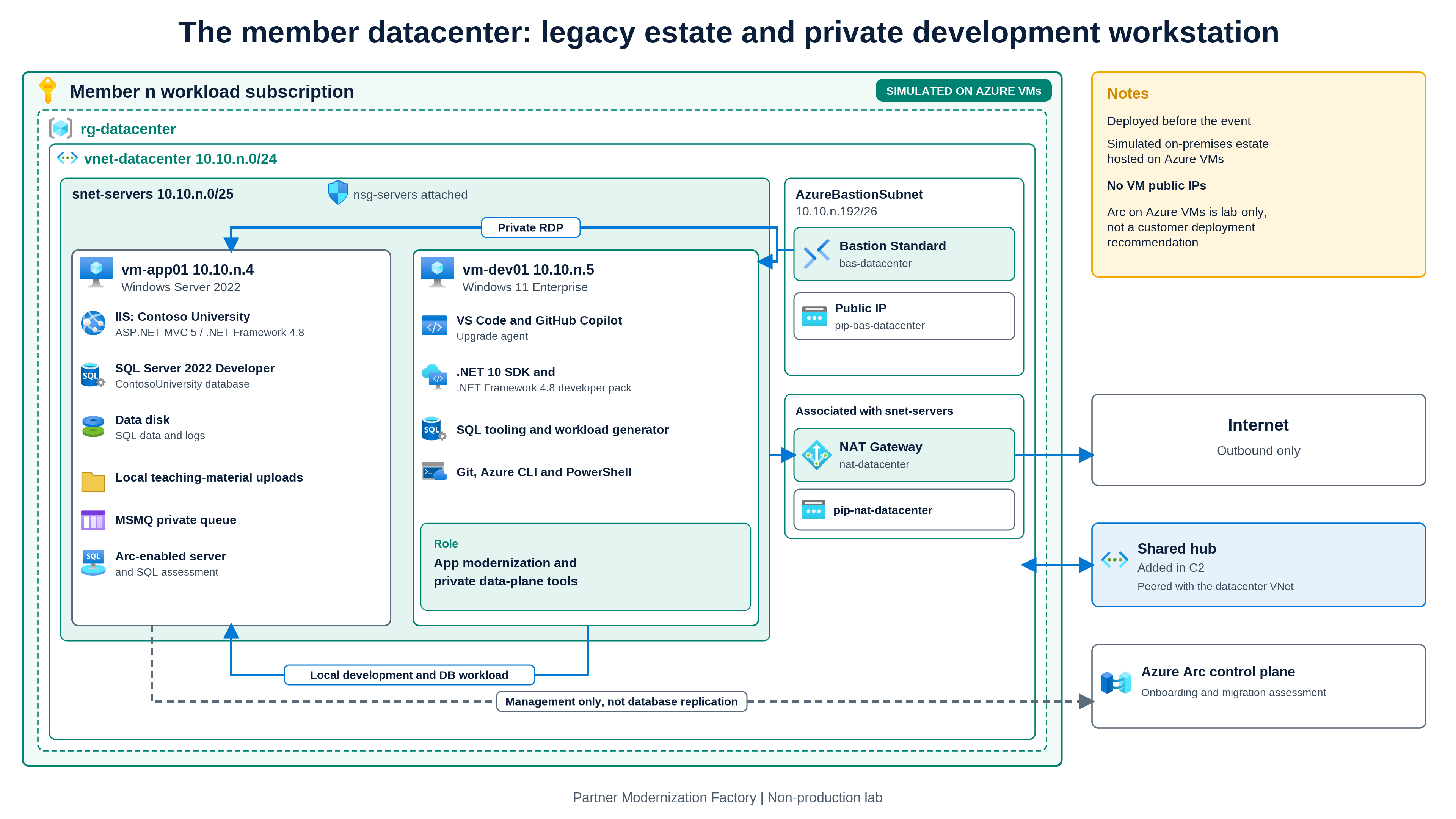
3.1 Deploy all datacenters and onboard Azure Arc
Section titled “3.1 Deploy all datacenters and onboard Azure Arc”Run all dispatches from factory/ in <event>-lead.
-
Tune job concurrency if needed (optional). By default,
<event>-leadruns up to20concurrent member jobs (MAX_PARALLEL). To adjust concurrency for your GitHub runner pool or regional ARM throttling limits, set theMAX_PARALLELrepository variable on<event>-leadbefore dispatching:Terminal window gh variable set MAX_PARALLEL --body "20" -
Dispatch the
memberstage across the cohort (wait for each run to finish before starting the next). Decide before your first dispatch which slots hold eligible Windows Server Azure Hybrid Benefit licenses—once a slot is Arc-onboarded, re-runningmemberrefuses to overwrite it (see Azure Hybrid Benefit):-
All slots eligible (up to 256 members):
Terminal window gh workflow run platform.yml -f stage=member -f members=all -
Mixed Hybrid Benefit cohort: partition your roster into disjoint index sets before deploying—run eligible indexes without the flag, wait for that run to finish green, then run ineligible indexes with
-f no-hybrid-benefit=true:Terminal window gh workflow run platform.yml -f stage=member -f members=<eligible-indexes>Once the first batch finishes green:
Terminal window gh workflow run platform.yml -f stage=member -f members=<ineligible-indexes> -f no-hybrid-benefit=true -
Large cohort (above 256 members, or staged waves): dispatch in index ranges of at most 256 jobs—waiting for each batch to finish green before dispatching the next:
Terminal window gh workflow run platform.yml -f stage=member -f members=1-50Once
1-50finishes green:Terminal window gh workflow run platform.yml -f stage=member -f members=51-100
-
-
Verify
Test-Datacenterresults in the Actions summary. Open the workflow run in<event>-lead> Actions. Confirm every member job is green and every row in itsTest-Datacenter.ps1summary reportsPASS(VM sizes and running state, license type, Trusted Launch secure boot and vTPM, zero public IPs, Bastion Standard, IIS response, SQL Server online, and performance dataset present). -
Verify Azure Arc status across the cohort. Check that
vm-app01reportsConnectedin Azure Arc for every slot in.local/roster.json:Terminal window $roster = Get-Content .local/roster.json | ConvertFrom-Jsonforeach ($m in $roster) {$status = az connectedmachine show -g rg-datacenter -n vm-app01 --subscription $m.subscriptionId --query status -o tsv 2>$null[pscustomobject]@{ Index = $m.index; ArcStatus = $status ?? 'MISSING' }}Every slot must show
Connected, and Azure Arc > SQL Server instances in the portal will listvm-app01’s SQL Server instance once the SQL extension finishes registering. Step 4 (vending) re-verifiesvnet-datacenterandvm-app01Connectedautomatically before vending each spoke.
3.2 Deliver readiness test evidence to each student repo
Section titled “3.2 Deliver readiness test evidence to each student repo”Run Initialize-CohortRepos.ps1 with -PushReadinessEvidence from factory/ in <event>-lead. It fetches each slot’s readiness-test-datacenter-member-<index> artifact from <event>-lead’s Actions run and commits factory/evidence/readiness/test-datacenter.txt straight to main on <org>/<event>-student-<nn>:
./scripts/Initialize-CohortRepos.ps1 ` -RosterPath .local/roster.json ` -TemplateRepository '<org>/<event>-student-template' ` -RepoPrefix '<event>-student' ` -PushReadinessEvidenceDone when each <event>-student-<nn> repository contains factory/evidence/readiness/test-datacenter.txt on main.
3.3 Start the Arc SQL assessments and manage VM power state
Section titled “3.3 Start the Arc SQL assessments and manage VM power state”-
Trigger or verify the Azure Arc SQL migration assessments. In the Azure portal under Azure Arc > SQL Server instances, open
vm-app01in a sample subscription (or across subscriptions) and check Migration > Assessments (see SQL Server enabled by Azure Arc migration assessment). If automatic assessment has not started yet, select Run assessment so findings forContosoUniversityagainst Azure SQL Managed Instance are ready when students review and export them during Student onboarding and C3: Assess the source. -
Optionally deallocate VMs until T-1 to reduce compute spend. Once Arc shows
Connectedandtest-datacenter.txtis pushed, you can stop VM compute billing across the cohort until Step 4 (T-1):Terminal window $roster = Get-Content .local/roster.json | ConvertFrom-Jsonforeach ($m in $roster) {az vm deallocate -g rg-datacenter -n vm-app01 --subscription $m.subscriptionId --no-waitaz vm deallocate -g rg-datacenter -n vm-dev01 --subscription $m.subscriptionId --no-wait}Remember to start both VMs across every subscription at the beginning of Step 4 (T-1) before running
vending.
Recovering a failed slot
Section titled “Recovering a failed slot”Never run an unfiltered teardown in <event>-lead before T+2—always scope recovery to the affected slot indexes:
-
Failure before Arc onboarding started: fix the quota or transient error and re-run the
memberstage for those indexes only:Terminal window gh workflow run platform.yml -f stage=member -f members=<index> -
Failure after Arc onboarding started (before C5):
memberrefuses to overwrite an existing Arc machine resource, and a half-onboarded VM has guest run commands disabled. Tear down that single member index first, wait forteardownto finish green in Actions, and then re-runmemberfor that index:Terminal window gh workflow run platform.yml -f stage=teardown -f members=<index>Once
teardownfinishes green:Terminal window gh workflow run platform.yml -f stage=member -f members=<index>(Add
-f no-hybrid-benefit=trueonmemberif that slot has no Windows Server Azure Hybrid Benefit.) Re-runInitialize-CohortRepos.ps1 ... -MemberIndex <index> -PushReadinessEvidenceafterward so the student’s repo holds the freshtest-datacenter.txtreport.