
The kit at a glance
This page is the big picture. When you’re ready to work, start with Requirements. Terms you don’t know are in the glossary.
Where do I run this?
Section titled “Where do I run this?”| Where | What you do there |
|---|---|
vm-dev01 | Your single workstation through Bastion, next to the private network. You run 100% of C1 to C10 here in a single clone (C:\src\<your-repo> on main), including APEX and azd in C5 and the Upgrade agent in C3 and C6. Never stop it during the event. Set up vm-dev01 (Path A) or Student onboarding (Path B). |
| Azure Cloud Shell | Browser shell (https://shell.azure.com) used before vm-dev01 exists at T-3 to import the kit and dispatch platform.yml in Path A (or by the team lead in Path B), and at T+2 to run teardown. |
| Browser and Azure portal | The Arc assessment, MI link, Bastion and C8 live checks. Follow the readiness assessment and C7 migration. |
Your own repo (C:\src\<your-repo> on main) | Working artifacts live in factory/evidence/ on main, alongside app/ContosoUniversity and infra/bicep/university in the same repo. |
Each challenge page has a Where to run block that says which one to use.
Your team lead assigns a distinct positive whole-number member index to each person, starting at 1 with the team lead as 1.
What changes
Section titled “What changes”| Layer | From | To |
|---|---|---|
| App | .NET Framework 4.8 | .NET 10 and ASP.NET Core MVC |
| Hosting | IIS on vm-app01 | A container image on App Service for Linux |
| Database | SQL Server | Azure SQL Managed Instance |
| Messaging | MSMQ | Azure Service Bus |
| Uploads | Local filesystem | Azure Blob Storage |
| Secrets | Configuration files | Azure Key Vault and managed identity |
| Telemetry | Local trace output | Application Insights through OpenTelemetry |
The journey
Section titled “The journey”Ten challenges across two days, from a defined opportunity to a reusable, AI-ready modernization pattern. Before day one, four numbered steps in Deploy set up your repo, foundation, datacenter, and spoke vending.
ReadinessA check before day one.See how to deploy.
TeamMember
- Plan and secureC1Define the opportunity
- C2Secure, AI-ready foundation
- Assess and deployC3Assess the source
- C4Choose target states
- C5Deploy the CoE archetype with APEX
- ModernizeC6Modernize with GitHub Copilot
- C7Migrate and go live
- C8Validate the pattern
- Optimize and hand overC9Optimize the DB with GitHub Copilot
- C10Package, hand over, review AI readiness
GHCP is GitHub Copilot. The MI link is the replication link from the source SQL Server to Azure SQL Managed Instance. The CoE archetype is a Center of Excellence’s reference platform, built with APEX and deployed with azd.
The end state
Section titled “The end state”The team shares one hub. Each member has a datacenter, a spoke and a CoE archetype. The foundation and spoke vending are deployed in Steps 2 and 4 before the event, C2 tests the repository and landing-zone guardrails against an AI coding agent, C5 deploys the archetype, C7 links the database and C8 checks the result.
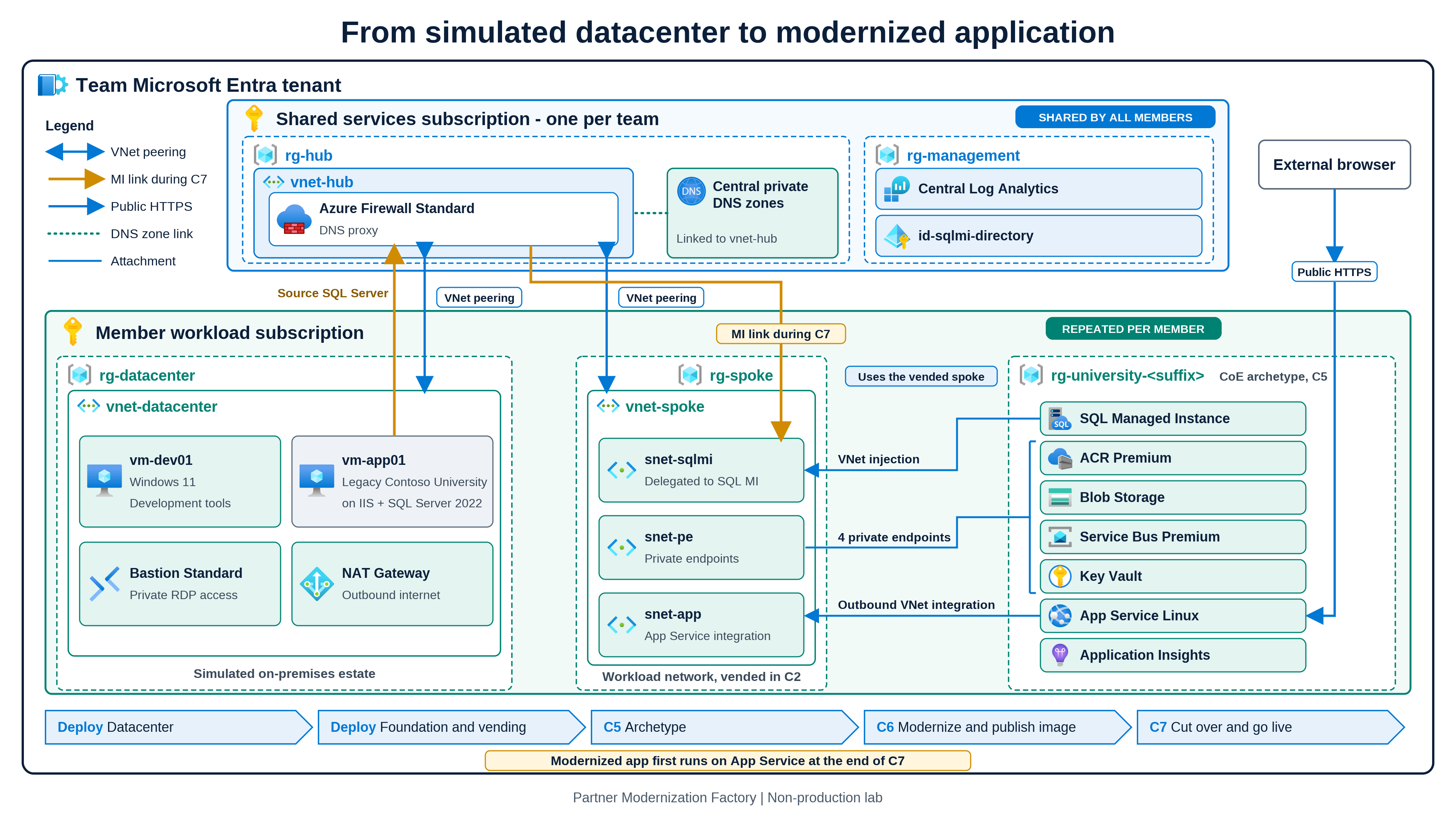
Explore the architecture by challenge
Pick a challenge to see the parts it touches. How it works shows which stage builds each part.
Text version of the diagram
- Management groups:
mg-factorycontainsmg-factory-platform(the shared services subscription) andmg-factory-corp(every member's workload subscription and the core policies). C2 verifies them. - Shared services subscription, one per team (C2). Resource group
rg-hubholdsvnet-hub(10.100.0.0/16) with Azure Firewall Standardafw-hub(10.100.0.4, DNS proxy, rules inafwp-hub), and the four central private DNS zones for Blob, Service Bus, ACR and Key Vault. Resource grouprg-managementholds the Log Analytics workspacelog-managementand the identityid-sqlmi-directory, which every member's SQL Managed Instance uses. - Member workload subscription, one per member (n ≥ 1: 10.10.n.0/24 and 10.20.n.0/24 for n = 1 to 255, or 10.(127 + floor(n/256)).(n%256).0/24 in 10.128.0.0/10 and 10.(191 + floor(n/256)).(n%256).0/24 in 10.192.0.0/10 for n ≥ 256). Resource group
rg-datacenter(built in the readiness check) holdsvnet-datacenter(10.10.n.0/24). Subnetsnet-servers(10.10.n.0/25) hasvm-app01(10.10.n.4, the legacy app and SQL Server) andvm-dev01(10.10.n.5, your workstation).AzureBastionSubnet(10.10.n.192/26) has Bastion Standardbas-datacenter. A NAT gatewaynat-datacenterprovides outbound internet. - Resource group
rg-spoke(vended at T-1) holdsvnet-spoke(10.20.n.0/24) withsnet-app(10.20.n.0/26, web app VNet integration),snet-pe(10.20.n.64/26, private endpoints) andsnet-sqlmi(10.20.n.128/26, SQL Managed Instance). - Resource group
rg-university-<suffix>(C5) holds the archetype: an App Service plan (P0v3) and web app with a public HTTPS front end, a container registry, a SQL Managed Instance, Blob Storage (containerteaching-materials), Service Bus (queuenotifications), Key Vault, Application Insights and the web app's managed identity. Registry, storage, Service Bus and Key Vault are reached through private endpoints insnet-pe. Application Insights ingestion stays public, allowed by a firewall rule. - Network flows (C2): the datacenter and the spoke each peer with the hub and send traffic through
afw-hubby user-defined routes. Both VNets useafw-hubas DNS server. - C7: the MI link runs from
vm-app01throughafw-hubtosnet-sqlmion TCP 5022 and 11000–11999. The datacenter and the spoke aren't peered with each other. - C7 and C8: from
vm-dev01you reach the private endpoints (TCP 443 and 5671) and the SQL Managed Instance (TCP 1433 and 11000–11999) throughafw-hub.